| Stationery |
  
|
| Stationery |
|
Stationery Templates are very useful for sending standard messages, or including specified information in messages. They also allow you to include a number of macros for the most commonly required fields in your replies.
Stationery will be always be offered for new messages or replies if so configured under the Editing Preferences.
Stationery can only be used when the message editor opens, usually be being set in the Folder Properties.
To access the Edit Stationery dialog use Configure  Edit Stationery.
Click on a HotSpot on the image below for further information.
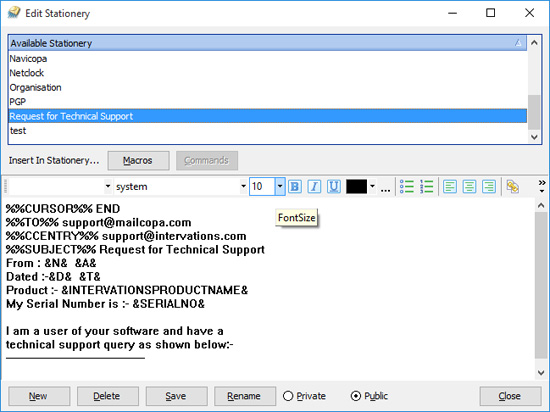
Note that there will be a "Request for Technical Support" (see Technical Support) template installed, which includes the information Intervations needs to deal with any problems you may encounter.
The Macros button gives access to a menu of macros (see below for complete list), which will insert information into the stationery being edited.
Although in clear text on the menu, they will be inserted in a slightly cryptic form, as shown above. This is so that MailCOPA will be able to interpret them when loading stationery, but also because two are configurable, Current Date and Date Message Sent (Short).
NOTE that these macros are interpreted and the results placed into the message when the message is first started, and will not change if the message is saved and re-edited.
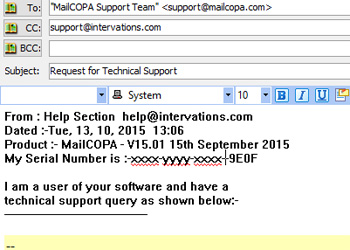
The stationery above would produce the following result with a reply (note it includes a couple of Commands):
Full List of Stationery Macros |
All messages or reply only |
|
Current Date |
All |
This will be in the format set in your Windows settings. Equivalent to Date Message Sent macros below, but retained from V15.01 for backwards compatibility. |
Current Time |
All |
This will be in the format set in your Windows settings |
Date Message Sent (long) |
All |
Date the message editor was opened - the format is taken from your Windows settings. |
Date Message Sent (short) |
All |
Date the message editor was opened - the format is taken from your Windows settings. |
Default Email Address of current user |
All |
This is configured here. This may not be the same as the actual address being used for this message, if for instance, the originating folder has been set to use another address. |
Free disk space |
All |
The amount of free disk space on MailCOPA's install drive (typically C: drive). |
MailCOPA Serial Number |
All |
The serial number of the MailCOPA installation being used for this message |
MailCOPA version |
All |
The version number and release date of the MailCOPA installation being used for this message |
Message CC recipients |
Reply only |
Lists the recipients in the CC: header field. |
Message ID |
Reply only |
The message ID (from the header) of the message being replied to. |
Message Number |
All |
The number used internally by MailCOPA for this message |
Message recipients |
Reply only |
Lists all of the recipients of this message, from the To: and CC: fields |
Message subject |
Reply only |
Subject of the message being replied to. |
My email address |
All |
The email address being used for this message - it may be the default, or that set in the properties of the originating folder. Will not be correct if a stationery macro has been used to modify it. Will not change if altered in the From: box at the bottom of the editor. |
Name of current user |
All |
Full name of the current MailCOPA user, set in User Details. This is NOT over-ridden by any setting in Folder Properties. |
Original message CC recipients |
Reply only |
The recipients listed in the CC: header of the original message |
Original message html format |
Reply only |
Include the html format portion (if any) of the original message. |
Original message quoted |
Reply only |
The text of the original message with quote marks added to the beginning of each line |
Original message |
Reply only |
The text of the original message, unquoted |
Sender's address |
Reply only |
Email of the address of the sender of the message being replied to. |
Sender's forename |
Reply only |
First name of the sender - this will be obtained from the From: header line This may not be correct if the original message does not have it correctly configured |
Sender's name |
Reply only |
Sender's full name -this will be obtained from the From: header line. This may not be correct if the original message does not have it correctly configured |
User number |
All |
The user number used internally by MailCOPA |
Windows version |
All |
The version of Windows on which the MailCOPA client is running |
These are more powerful than the macros, and enable you to do such things as set the subject of a message, add a BCC address, set the signature. Each must be on its own line.
Full list of Macro Commands |
|
Attach file |
Attach a file to the message. Ensure that the file can be found on the machine being used with this stationery. On a network installation it is best to use a full network path or mapped drive, eg: \\server_name\path\file.ext N:\path\file.ext |
Prefix subject |
Add some text to the beginning of the subject. This will effectively set the subject for new messages, and will prefix the subject in replies, eg: type the prefix here: Re: test |
Put cursor at end of message |
When the editor opens, place the cursor at the end of the message. |
Put cursor at top of message |
When the editor opens, place the cursor at the top of the message. |
Put cursor into subject field |
When the editor opens, place the cursor into the subject field. |
Request read receipt |
Automatically add a request for a read receipt - NOTE that this is not universally honoured. |
Set BCC |
Set the BCC field in the header |
Set CC |
Set the CC field in the header |
Set From |
Set the address from which this message will be sent. NOTE that this will override settings elsewhere, eg the default or any setting in Folder Properties You may use any address, not just those listed for this user. |
Set signature |
Set the signature to one that has already been created |
Set subject |
Set the subject when the editor opens. This will change the subject for replies. |
Set To: address |
Set the address to which the message will be sent, overriding any settings in Folder Properties. NOTE that this will also be the case in replies, where the original sender's address will be overwritten. |