| Encrypting Messages |
  
|
| Encrypting Messages |
|
This includes two functions:
•The encryption of messages so they can only be read by the intended recipient(s)
•The signing of messages to confirm the identity of the sender.
Two different systems are supported by MailCOPA:
•S/MIME, which uses Security Certificates built-in to Windows - please click here for details
•Open PGP, where you generate your own Encryption Keys - please click here for details.
This uses the system of Security Certificates built-in to Windows and you first need to obtain your own certificate. NOTE that a certificate relates to an individual Email Address.
S/MIME has the advantage that any attachments sent with a message will also be encrypted.
Obtaining and installing your own S/MIME Certificate
A number of organisations provide these, usually for a fee, but free certificates are available. An internet search will provide much information, but this page may prove useful. One of the simplest procedures is provided by this site. NOTE that you must undertake the whole of the process using Internet Explorer.
Organisations that charge a fee will usually take steps to confirm your identity, so the certificate will show exactly who you are.
A free certificate does not confirm who you are, but will confirm that communications using it will have come from the same person.
Help & Support for your version of Windows will provide more information about the management of certificates on your machine.
Your certificate will consist of both the Public Key and the Private Key.
NOTE that certificates work on an email address - if you use more than one you MUST obtain a certificate for each of them in order to be able to use these addresses.
Configuring MailCOPA to handle S/MIME certificates is covered here.
MailCOPA provides the facility to generate your own key pair (without the need for any external software), or you can use an existing PGP key pair. NOTE that a Key Pair relates to an Email Address. If you use more than one email address, you must generate key pairs for each if you with to use PGP encryption or signing.
Open PGP key pairs generated by MailCOPA may also be used elsewhere if you wish - they conform to the Open PGP standard.
Other keys may also be used here as they conform to the Open PGP standard, eg GnuPG.
Configuring MailCOPA to handle Open PGP keys is covered here.
Obtaining the Public Keys of other people.
Ask them to send your public key as an attachment. Look in the Attachments Pane above the Quick Viewer and you will see a special icon:
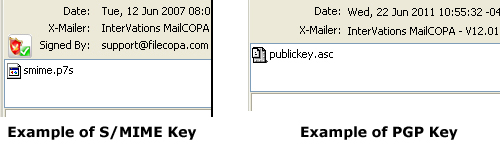
Right-click on the special icon to inspect and/or install the certificate. Installed certificates/keys will be included in the address book details for that person.
NOTE that a number of different file extensions are used, for instance a S/MIME public key may also have the extension .pem
NOTE too that with a message signed with S/MIME you probably won't need the other person's public key as this will usually be included with their message, enabling MailCOPA to immediately verify their message. With Open PGP, you must have their public key.
Once you have someone's Public Key, you can send encrypted messages to them, and decrypt encrypted messages they send you.
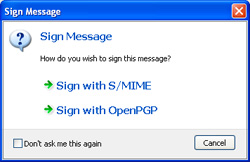
Start a new message, or a reply, and click the  button before sending.
The dialog to the right will appear. Click a hotspot for more information |
|
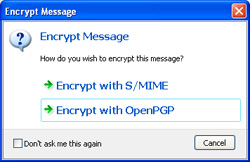
Start a new message, or a reply, and click on the  button before sending.
The dialog to the right will appear. Click a hotspot for more information |
|
If using S/MIME, any attachments sent with a message will also be encrypted, but this is not the case with Open PGP.
The Mechanism of Signing and Encryption
Both S/MIME and Open PGP use dual keys: a Public Key that can be made available to anyone, and a Private Key which is only accessible to its owner - it will be installed on their computer.
These have a complex mathematical relationship and are (theoretically) unique and it is impossible (theoretically) to guess one from the other.
Any text signed or encrypted with one key can only be accessed using the other. Each key of the pair has no significance, but for security, one key is designated as Private (accessible only by its owner), and the other as Public, freely available so as to allow access to signed messages, and to encrypt messages.
A message is encrypted using the Public Key of the recipient - only that person will have the corresponding Private Key to decrypt it.
A message is signed using the Private Key of the sender (who is the only person with access to it), and when analysed by the recipient using the sender's Public Key, the identity of the sender will be confirmed.